# Introduction to Open Graph Meta tags
### What are Open Graph meta tags?
[Open Graph](~https://ogp.me/~) is a an internet protocol that was developed by Facebook
back in 2010. They allow you to control what is displayed when a url of your page
is shared on social media networks like Twitter, Facebook, LinkedIn, etc.
### Basics of Open Graph
The four basic properties used are:
- `og:title` - The title of the content on the page
- `og:description` - A description of the content on the page you are sharing
- `og:image` - An image url which will be used to represent your content
- `og:url` - The url of the current page
- `og:type` - The type of page you are describing e.g. article, website
> Tip: For the images; the minimum recommended dimensions are 1200 x 630
> for optimal clarity across different platforms and devices.
### Usage
Open Graph meta tags are usually placed in the `` section of a website.
They are identified by the prefix `og:` which is in the `property` attribute of a meta tag accompanied by the `content` attribute with a value.
```html
```
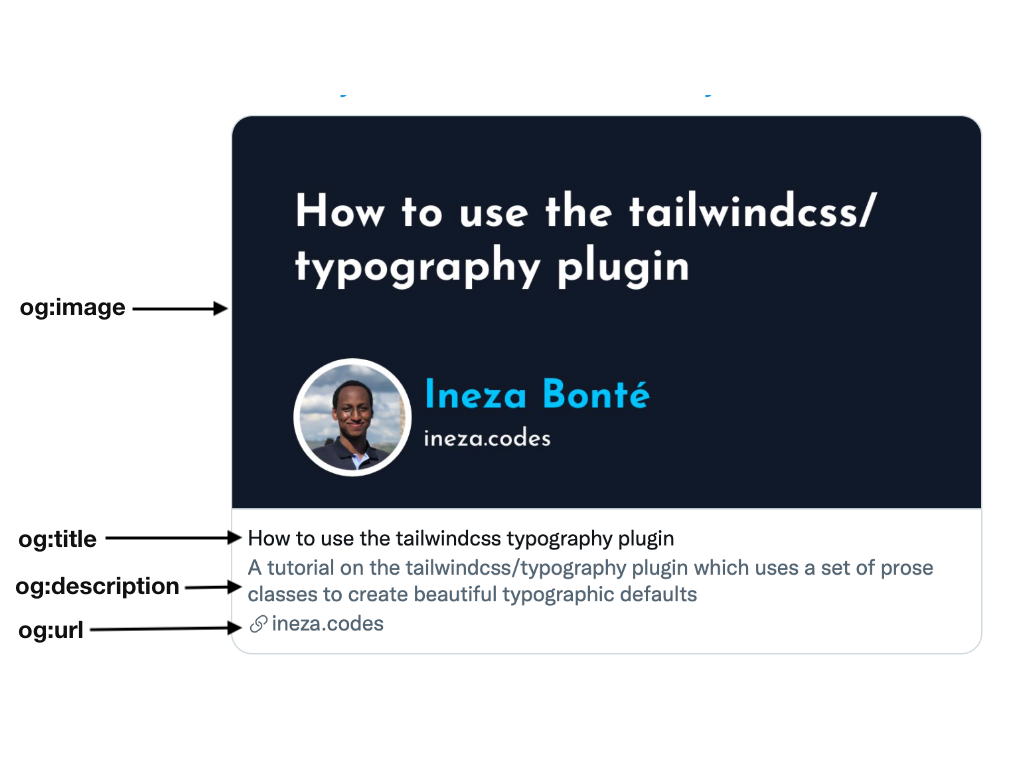
### Why should we use open graph tags?
Their purpose is to make your content eye-catching at the same time providing an
overview of the content the user should expect when they visit the url. This can help to
grow your brand by increasing visibility.
### Additional Social Media tags
Some social media sites like twitter have their own open graph tags that help
to customize the look of the content shared within their ecosystem.
For instance Twitter has a `twitter:card` property which can be used to
specify the type of card twitter uses to display your content. It takes the following
values;
- `summary`
- `summary_large_image`
- `app`
- `player`
It also has the `twitter:creator` property which can be used to specify
the username of the content creator/author
Here is a [link](https://developer.twitter.com/en/docs/twitter-for-websites/cards/guides/getting-started) to the documentation with more details.
### Testing Open Graph tags
There are tools available that can help you test your url, to know
whether the Open Tags are working and also get a preview of how they
will look once posted on social media.
- [Twitter Card Validator](https://cards-dev.twitter.com/validator)
- [LinkedIn Post Inspector](https://www.linkedin.com/post-inspector/inspect/)
### Resources
For more information about Open Graph meta tags here is a list of resources
that helped me in the writing of this article.
- [The Open Graph protocol](https://ogp.me/)
- [Open Graph Meta Tags: Everything You Need to Know](https://ahrefs.com/blog/open-graph-meta-tags/)
- [What is Open Graph?](https://www.computerhope.com/jargon/o/open-graph.htm)
- [What is Open Graph and how can I use it for my website?](https://www.freecodecamp.org/news/what-is-open-graph-and-how-can-i-use-it-for-my-website/)
Thank you for reading ❤️