Introduction to Open Graph Meta tags

What are Open Graph meta tags?
Open Graph is a an internet protocol that was developed by Facebook back in 2010. They allow you to control what is displayed when a url of your page is shared on social media networks like Twitter, Facebook, LinkedIn, etc.
Basics of Open Graph
The four basic properties used are:
og:title- The title of the content on the pageog:description- A description of the content on the page you are sharingog:image- An image url which will be used to represent your contentog:url- The url of the current pageog:type- The type of page you are describing e.g. article, website
Tip: For the images; the minimum recommended dimensions are 1200 x 630
for optimal clarity across different platforms and devices.
Usage
Open Graph meta tags are usually placed in the <head> section of a website.
They are identified by the prefix og: which is in the property attribute of a meta tag accompanied by the content attribute with a value.
<meta property="og:title" content="TailwindCSS setup tutorial" />
<meta property="og:type" content="article" />
<meta property="og:url" content="https://url-of-currentpage.com" />
<meta property="og:image" content="https://url-of-image.png" />
<meta property="og:description" content="A description about your content"/>
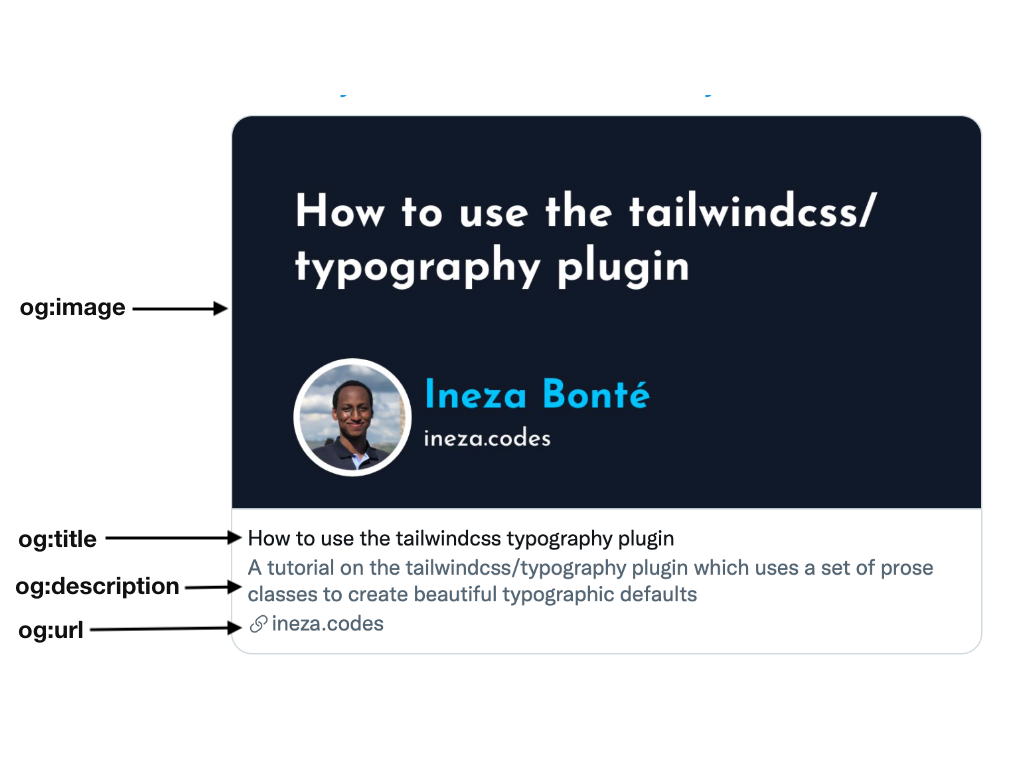
Why should we use open graph tags?
Their purpose is to make your content eye-catching at the same time providing an overview of the content the user should expect when they visit the url. This can help to grow your brand by increasing visibility.
Additional Social Media tags
Some social media sites like twitter have their own open graph tags that help to customize the look of the content shared within their ecosystem.
For instance Twitter has a twitter:card property which can be used to
specify the type of card twitter uses to display your content. It takes the following
values;
summarysummary_large_imageappplayer
It also has the twitter:creator property which can be used to specify
the username of the content creator/author
Here is a link to the documentation with more details.
Testing Open Graph tags
There are tools available that can help you test your url, to know whether the Open Tags are working and also get a preview of how they will look once posted on social media.
Resources
For more information about Open Graph meta tags here is a list of resources that helped me in the writing of this article.
- The Open Graph protocol
- Open Graph Meta Tags: Everything You Need to Know
- What is Open Graph?
- What is Open Graph and how can I use it for my website?
Thank you for reading ❤️
Comments
Join the discussionNo comments yet. Be the first to comment.

